
Punch-in recording means re-recording just one part of a track — a word, a line, a few bars — while the rest of the take stays as it was. The recording switches on at the “punch-in” point and off at the “punch-out” point, so you replace only the mistake. It’s one of the most useful skills a home recordist can learn.
The term comes from tape days, when an engineer would literally punch the record button mid-playback. Today it’s done in recording software, but the idea hasn’t changed: keep the good, replace the bad.
What punch in and punch out mean
- Punch in: the moment recording starts, partway through an existing track.
- Punch out: the moment recording stops, returning to the original take.
- Pre-roll: the part of the song played back before the punch-in point, so you can get into the groove.
- Post-roll: playback after the punch-out, so you can hear how the fix joins up.
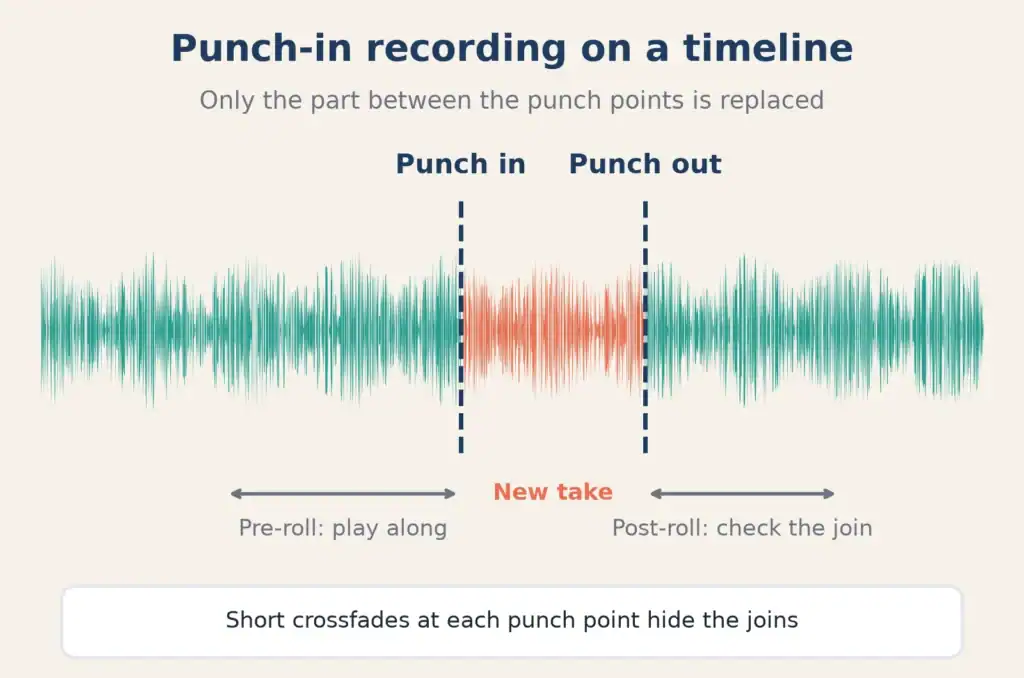
Everything before the punch-in and after the punch-out stays untouched.
When to punch in (and when to just do another take)
Punching in is the right tool when:
- one line or a few notes are off, and the rest of the take has the feel you want;
- a single wrong chord or fluffed note spoils an otherwise great instrument part;
- you’ve run out of voice but only need to redo a short phrase.
It’s often better to record a whole new take when:
- the mistake is spread across the whole performance;
- the energy or tone has changed so much that a short fix will stand out;
- you’re still finding the part. Punch-ins are for fixing, not for writing.
How to punch in, step by step
The exact buttons vary between recording programs, but the workflow is almost always the same.
1. Find the mistake and choose your boundaries
Loop the problem section and listen. Pick a punch-in point just before the mistake and a punch-out point just after. Good places to punch are:
- in a gap or a breath, before a word starts;
- on a hard consonant like “t,” “k,” or “p,” where a join is easy to hide;
- at the start of a bar or phrase for instruments.
Avoid punching in the middle of a sustained note or a held vowel. Those joins are the hardest to hide.
2. Set your pre-roll
Give yourself at least a bar or two of playback before the punch-in, so you’re already performing when recording begins. Singers usually want more — often the whole previous line — to match the delivery.
3. Match the original setup
This is the step that makes or breaks a punch-in. Before recording, check that:
- the microphone is in the same position and at the same distance;
- your input level hasn’t changed;
- you’re standing or sitting the same way;
- your headphone mix is similar.
If anything has moved, the new section will sound different, even if the performance is perfect. Songsmith’s 7 steps to being a better studio engineer has more on keeping your sessions consistent.
4. Sing or play along with the pre-roll
Perform along with the existing take during the pre-roll, as if you were recording the whole thing. That way the punch-in catches you mid-performance, matching energy and pitch.
5. Record, then check the joins
Listen back to the punch with plenty of context before and after. Ask: does the tone match? Does the breath sound natural? Is there a click or a jump in the room sound?
6. Smooth the edges
Most recording software applies short crossfades at the punch points. If you hear a click or bump, adjust the crossfade or move the edit point a few milliseconds to a quieter spot.
Punch-in vs comping
Punching in and comping solve similar problems in different ways:
- Punching in replaces part of one take with a new recording.
- Comping — short for compiling — means recording several full takes and then choosing the best sections from each to build one composite performance.
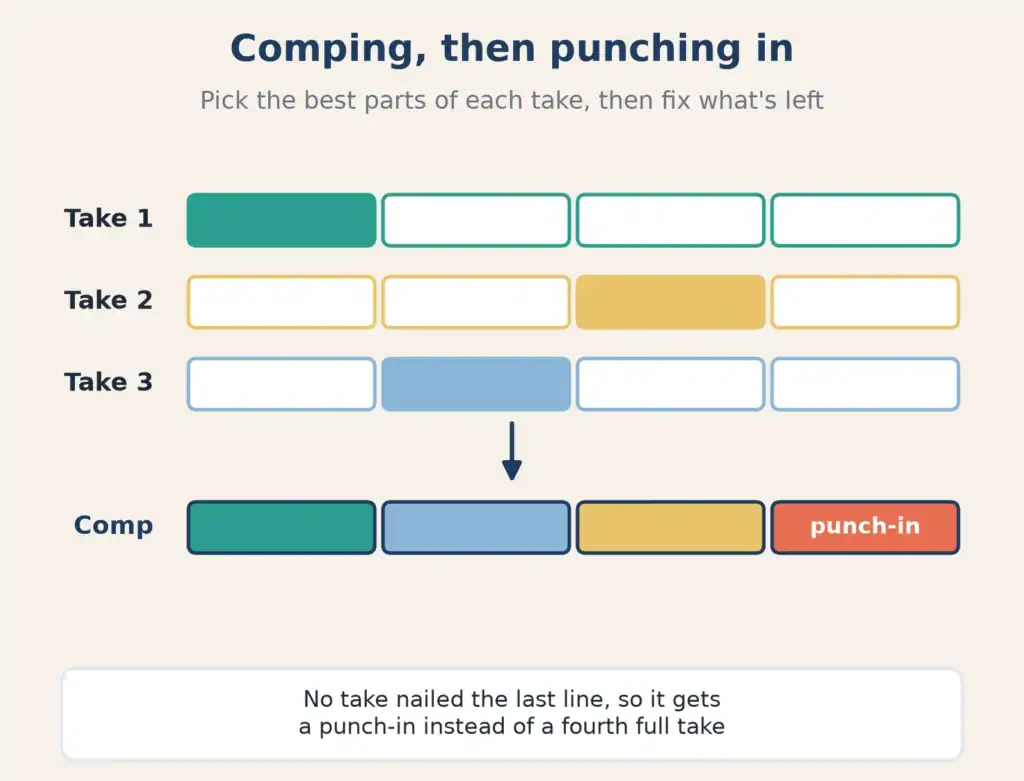
Many home recordists use both: comp the lead vocal from three or four takes, then punch in a line or two that none of the takes got quite right.
Punching in vocals: making it sound like one take
Vocals are where punch-ins are hardest to hide, because the human voice changes over a session. A few habits help:
- Punch in soon after the original take, while your voice is in the same state.
- Match the emotion, not just the notes. Listen to the line before and copy its energy.
- Mind your breaths. A missing or doubled breath is a giveaway.
- Don’t over-fix. A slightly imperfect line that sounds natural beats a perfect one that sounds pasted in.
Songsmith’s 13 tips for recording better vocals at home covers getting the core vocal take right in the first place.
Where punch-ins fit in your workflow
You’ll punch in most often when you’re tightening a scratch vocal into a keeper, cleaning up harmonies you’ve stacked yourself, or fixing a single word in an otherwise great take. Before you hand the session to anyone for mixing, listen through a rough mix to make sure every punch is invisible.
FAQ
What does punch in mean in recording?
Punch in means starting to record partway through an existing track so you only replace a specific section. Punch out is where recording stops again.
What’s the difference between punching in and overdubbing?
Overdubbing means recording a new part on top of what’s already there, on a separate track. Punching in means replacing a section of an existing part.
How do I make a punch-in unnoticeable?
Keep the mic, level and position identical, give yourself plenty of pre-roll, punch at a gap or consonant, and listen back with context.
Is it better to punch in or record a new take?
Punch in for small, isolated mistakes. Record a new take if the problems are spread across the performance or the feel has changed.
What is auto punch?
Auto punch is a recording setting where you set punch-in and punch-out points in advance, so the software switches recording on and off automatically while you perform.