
To record to a click track, set your song’s tempo in your DAW, turn on the metronome so it plays while you record, add a count-in of one or two bars, and send the click to your headphones only, never to the microphone. Then play with the click instead of against it. Treat it as a bandmate holding the tempo, not a judge, and you keep the feel while gaining a take you can actually edit.
That last part is where most self-recording musicians struggle. The setup takes two minutes. Playing naturally against a steady pulse takes practice. This guide covers both: what a click is for, whether your song needs one, the exact steps in Logic Pro, and the habits that stop a click from making you sound stiff.
What is a click track in music recording?
A click track is a steady pulse, usually a short tick or wood-block sound, that plays at the song’s tempo while you record. You hear it in your headphones. It is never part of the finished song.
People use “click” and “metronome” almost interchangeably, and in a DAW they are the same thing. Logic Pro calls it the metronome. A “click track” is just the metronome you record against, sometimes with extras like a drum loop or spoken cues added.
What a click does for a recording:
- It locks every layer to the same tempo. Your guitar, scratch vocal, bass and harmonies all line up with each other and with the bar grid.
- It makes editing possible. If the song sits on the grid, you can copy a chorus, move a phrase, or punch in a fix and the timing still matches.
- It lets parts recorded weeks apart, or by different people, fit together.
- It keeps tempo-based effects in time. A delay set to quarter notes only lands right if the performance follows the tempo.
Sound On Sound’s guide to playing to a click lists those same benefits, along with the main downside: a rigid click can squeeze out the natural ebb and flow of a performance and leave a song sounding “sterile and cold.” That is the real tradeoff you are managing.
Should I record to a click track?
Most of the time, yes, if you plan to build the song up in layers. Recording alone at home almost always means overdubbing, and overdubbing is much easier when every part shares a fixed tempo.
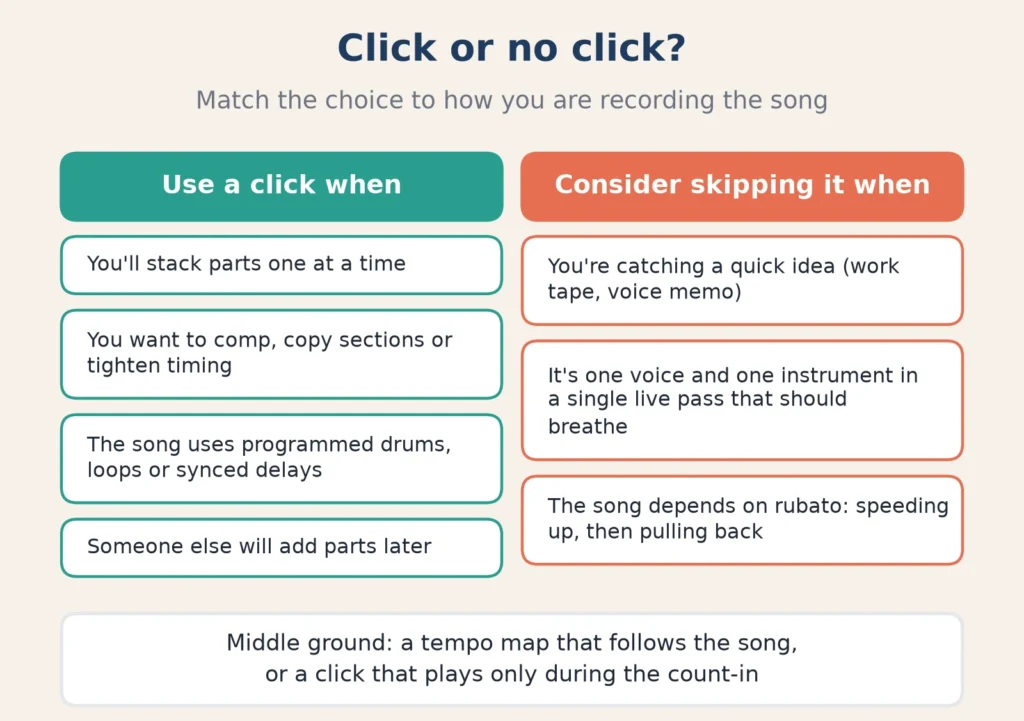
Use a click when:
- You will stack parts one at a time (guitar first, then vocals, then harmonies).
- You want to edit freely: comping takes, copying sections, tightening timing.
- The song uses programmed drums, loops, or synced delays.
- Someone else will add parts later and needs a stable tempo map.
Consider skipping it when:
- You are capturing a quick idea, like a work tape or voice memo, where speed matters more than editability.
- The song is solo voice and one instrument recorded in a single live pass, and the tempo is meant to breathe.
- The song depends on rubato: speeding up into a big moment and pulling back at the end.
Even then you have middle-ground options, covered below: a tempo map that follows the song, or a click that plays only during the count-in.
If you decided the song’s tempo during pre-production, you already have the number you need. This guide picks up from there, at the point where you hit record.
How do I set up a click track in Logic Pro?
Here are the steps in Logic Pro for Mac. The menu names come from Apple’s Logic Pro User Guide.
- Set the project tempo. Enter your tempo in the control bar’s display before you record anything.
- Turn the metronome on. Click the Metronome button in the control bar, or press K.
- Choose when it clicks. Control-click the Metronome button. “Click While Recording” plays it whenever you record. “Click While Playing” plays it during playback too. “Only During Count-In” gives you the count-in and then goes silent, which is useful for rubato songs. Apple notes that Click While Recording must also be chosen for Only During Count-In to work.
- Turn on the count-in. Click the Count-in button in the control bar, or press Shift-K.
- Set the count-in length. Choose Record > Count-in and pick a number of bars or beats, or set it in File > Project Settings > Recording. One bar is enough for most songs. Two bars helps on slow tempos.
- Adjust the click sound if needed. Control-click the Metronome button and choose Metronome Settings, which opens File > Project Settings > Metronome. There you can choose which beats click (bar, beat, division) and change the sound and level.
Apple also notes that the metronome always plays at the project tempo. If the project has a tempo map, with changes across sections, the click follows it.
Making the click easier to hear
A click that disappears under a loud guitar is useless. One that is piercing wears you out in twenty minutes. A few fixes:
- Turn on divisions for slow songs. Eighth-note or sixteenth-note subdivisions give you more reference points, so you drift less between beats.
- Use a softer sound. A wood block or rim click is easier on the ears than a sharp digital beep.
- Accent the downbeat. A different sound on beat one helps you keep your place in the bar.
How do you record to a click without killing the feel?
The fear is understandable. You have probably heard demos where every note sits on the grid and the song feels like it is marching. A click does not cause that by itself. It happens when the performer chases the click instead of playing the song. Here is how to avoid it.
1. Play around the click, not on top of it
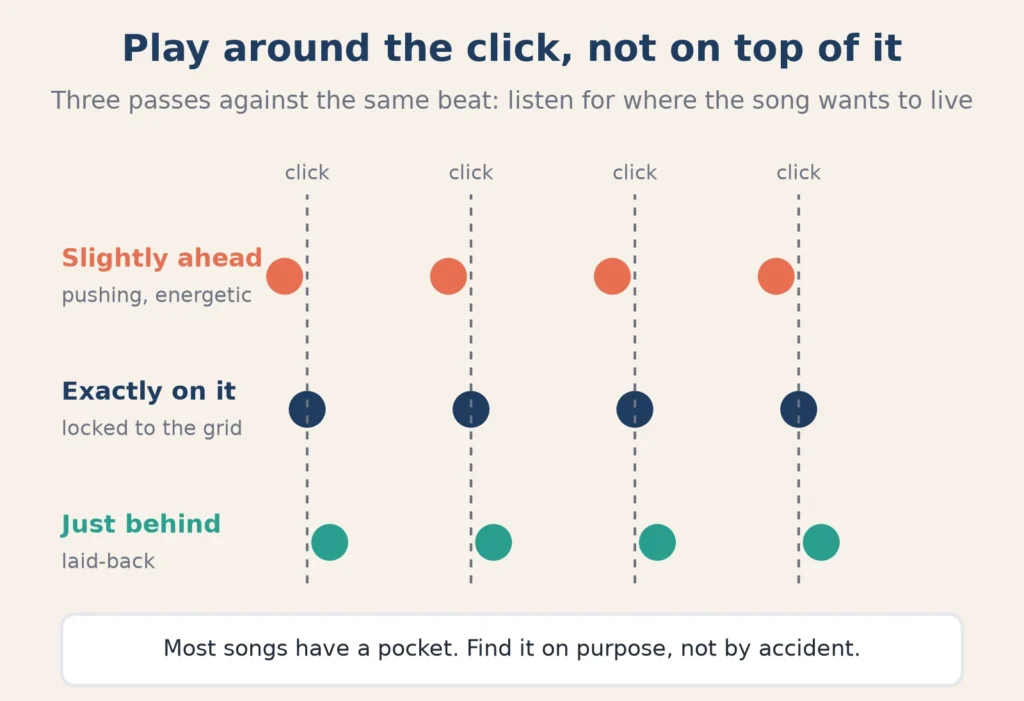
The SOS guide calls this playing “loosely tight.” Try a run where your notes land slightly ahead of the click for a pushing, energetic feel. Then do one sitting exactly on it, and one sitting just behind it for a laid-back feel. Listen back and see where the song wants to live. Most songs have a pocket, and finding it on purpose is far better than arriving there by accident.
2. Swap the beep for a groove
A plain quarter-note click feels nothing like a drummer. A simple drum loop or programmed kick, snare and hi-hat pattern at the same tempo feels much more like playing with a band, and you lock into it more naturally. Many songwriters who hate the metronome are fine with a basic beat.
3. Let the tempo move with the song
If your song naturally lifts in the chorus, you can build that into the click with a tempo map instead of fighting it. SOS suggests building the map from a rehearsal recording. Logic’s Smart Tempo can detect tempo from a performance, and the metronome follows the result. Keep the changes small, a beat or two per minute. That keeps the push and pull without making the song unrecognizable.
4. Practice with it before the session
If you only hear a click when the red light is on, you will feel it as pressure. Play the song to the click a few times while you warm up, with nothing recording, so the pulse becomes background.
5. Mute it for the parts that should breathe
For a free intro or a held final chord, set the metronome to “Only During Count-In,” or record that section separately without a click and edit it in. Nothing says the whole song must sit on one grid.
How do you actually use a click while you track?
These are the practical details that make or break a session at home.
Keep the click out of the microphone. If you sing or play an acoustic instrument with open-back headphones or a loud headphone mix, the click can leak into the mic. That is very hard to remove later, especially in quiet parts. Use closed-back headphones, keep the click only as loud as you need, and listen to the start of each take for a faint tick. Our guide to headphones for the recording artist covers how closed-back models help here.
Balance it in your headphone mix. You should hear the click clearly, but under the music. If it is the loudest thing in your ears, you will play to it rigidly.
Use the count-in to breathe, not rush. One bar of count-in is four clicks of “get ready.” Use them to set your hands or take a breath, and come in when the song would, not the instant the count ends if the part starts on a pickup.
If you come in late, keep going. Do not stop on the first slightly late note. Finish the take. You can comp or punch in that bar later, and stopping every time kills momentum.
Start with a guide part. A scratch vocal or rough guitar recorded first to the click gives every later overdub something musical to follow, not just a tick.
If the click sounds “late,” check monitoring before your timing. If you hear yourself through the computer, a delay between playing and hearing can make you feel behind the click when you are not. That is a separate problem with its own fix, covered in our guide on how to reduce latency when recording.
Common click track mistakes
- Choosing a tempo in a hurry. If the click is wrong for the song, every take will feel off. Play along at a few tempos first and pick the one where the vocal sits comfortably.
- Recording the click into the track. Check by soloing the vocal or acoustic take and listening between phrases.
- Quantizing everything afterward. A click makes editing possible, but snapping every note to the grid is a choice, not a requirement. Fix the obvious mistakes and leave the rest human.
- Using a click on songs that should float. If the song loses its emotion on a grid, use a tempo map or a count-in-only click, or record without one.
Did famous records use click tracks?
Plenty did and plenty did not. Click tracks became common as multitrack recording, drum machines and sequencers took over studios, because those tools need a fixed tempo. Many classic band records cut live in a room have tempo drift that you can hear if you play a metronome alongside them. Neither approach is “correct.” The question is whether your song, and the way you will build it, needs a fixed grid. For most songs recorded alone at home, it does.
FAQ
What is recording to a click track?
It means recording while you hear a steady metronome pulse in your headphones, so the performance stays at a fixed tempo. The click is not recorded and is not part of the song.
Is a click track just a metronome?
Basically, yes. In a DAW the metronome is the click. A “click track” can also mean a custom guide track with a drum loop, count-ins and spoken cues like “chorus,” but the purpose is the same.
How do I record a click track in Logic Pro?
Set the project tempo, turn on the metronome (K), Control-click the Metronome button and choose Click While Recording, then turn on the count-in (Shift-K). The full steps are in the Logic Pro section above.
Do all drummers use click tracks?
No. Many drummers record to a click for modern productions, especially with loops or electronic parts. Others prefer to record a band live without one. It depends on the song and how it will be edited.
Should singers practice with a metronome?
It helps. Singing to a metronome trains steady timing and makes recording to a click feel natural. Practice phrases slightly ahead of and behind the beat so you learn to control where your timing sits.
How do you set a metronome to a song?
Find the tempo the song feels best at, either by tapping along or by trying a few tempos while you play. Enter that number as the project tempo before you record. If the song already exists as a recording, Logic’s Smart Tempo can analyze it.