
For recording vocals at home, use 44.1 kHz or 48 kHz at 24-bit. Pick 48 kHz if the song might end up in a video, and 44.1 kHz if it is purely for music release and you prefer to match the traditional CD rate. Either one captures the full range of the human voice. Bit depth matters more than sample rate for home recording: always record at 24-bit, not 16-bit.
Set it once at the start of a project, make sure your interface matches, and get back to singing. Here is the reasoning, so you can make the choice with confidence.
What sample rate should I use for recording vocals?
Sample rate is how many times per second the audio is measured when it is converted to digital. At 44.1 kHz, that is 44,100 snapshots every second.
A sample rate can capture frequencies up to half its value. So 44.1 kHz reaches about 22 kHz, and 48 kHz reaches about 24 kHz. Human hearing tops out around 20 kHz, and a voice’s useful content, including the airy top end of a breathy vocal, sits below that. Both common rates already cover everything a listener will hear from a vocal.
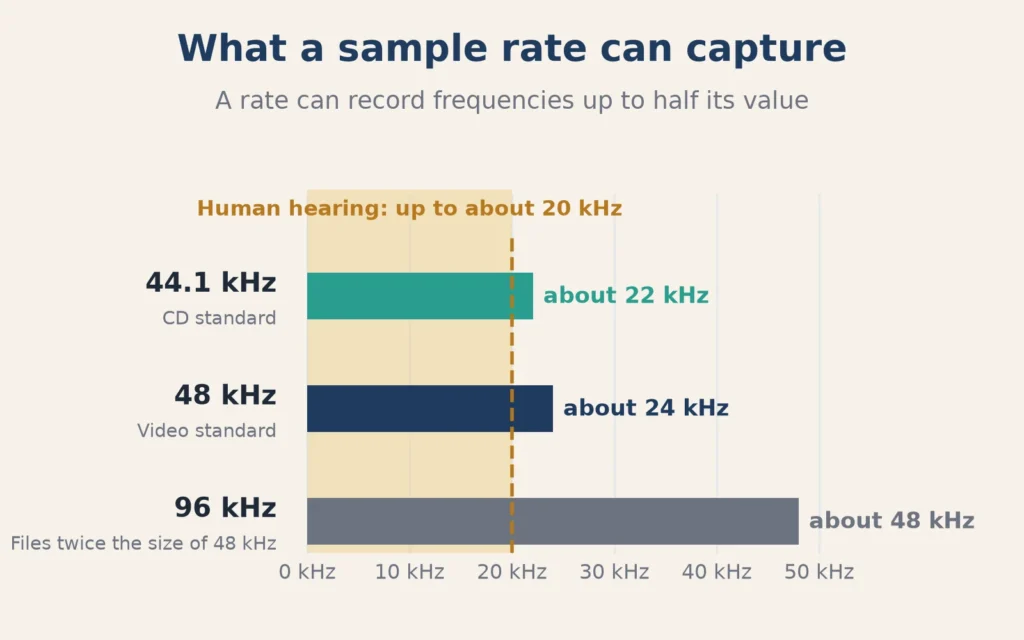
Apple’s Logic Pro User Guide puts the standards simply: “The CD standard uses the rate of 44.1 kHz, while video formats commonly use 48 kHz. Modern recordings can use rates of 96 kHz up to 192 kHz.” The same page notes that higher rates need more processing power.
44.1 vs 48 kHz: which one should I pick?
For a vocal, the difference is not something you will hear. The choice is about where the audio is going:
- 48 kHz is the standard for video. If a song might be used in a music video, a YouTube upload, a short-form clip, or sync, starting at 48 kHz avoids a conversion later.
- 44.1 kHz matches the CD standard and a lot of music distribution. It makes slightly smaller files.
If you are unsure, 48 kHz is a safe default for new projects. What matters most is that the whole project, and your interface, use the same rate.
Should I record at 48 kHz or 96 kHz?
For a home vocal, 96 kHz mostly costs you. Files are twice as big as at 48 kHz, your computer works harder, and you can run fewer plug-ins before the system struggles. That pressure can push you to raise your buffer size, which adds delay in your headphones while you sing.
Higher rates have uses, such as heavy pitch or time stretching, sound design, and some professional delivery specs. But they do not make a singer sound better, and a quiet room and good mic technique will improve your vocal far more than a higher number.
What is bit depth in audio?
Bit depth is how precisely each of those snapshots measures loudness. More bits mean more possible levels between silence and the loudest signal, which means a wider dynamic range and a lower noise floor.
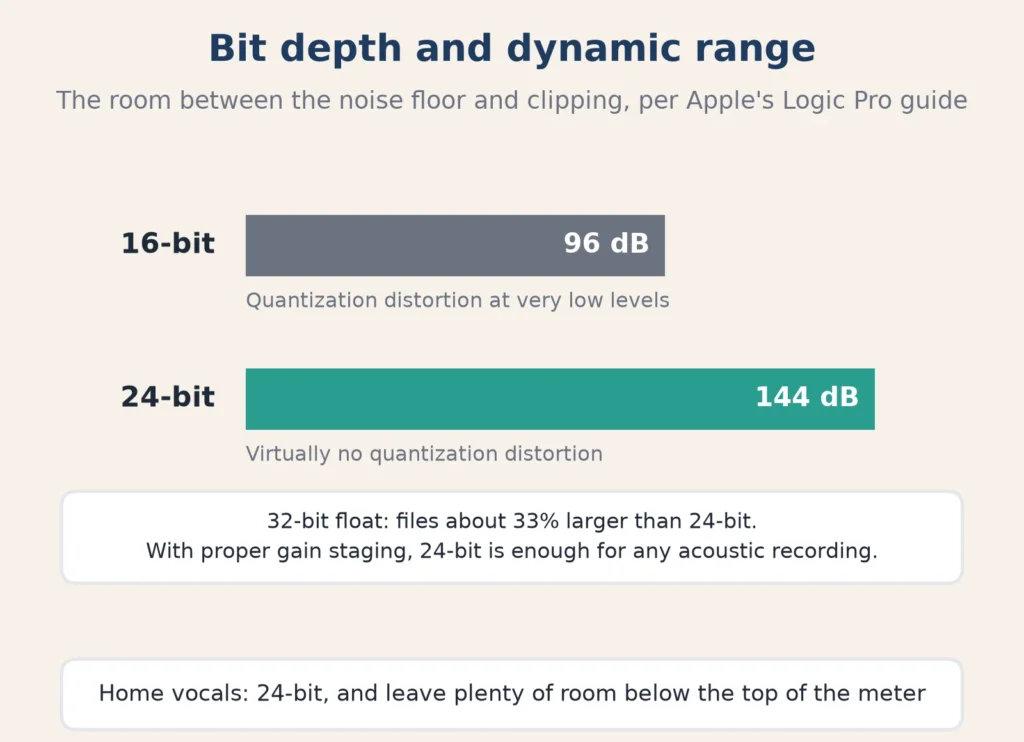
Apple’s Recording settings page gives the numbers. A 16-bit file has a dynamic range of 96 dB and can produce “quantization distortion at very low signal levels.” A 24-bit file has 144 dB with “virtually no quantization distortion,” at about 50 percent more file size. Apple calls 24-bit “the most commonly used bit depth.”
Should I record at 16-bit or 24-bit?
24-bit, every time. This is the setting that actually affects your home recordings.
At 24-bit you do not have to record hot. You can leave plenty of room below the top of the meter, so a sudden loud note does not clip, and the quiet parts still sit far above the noise floor. At 16-bit, a cautious recording level wastes resolution you cannot get back.
That is why bit depth and recording level go together. How much room to leave, and how to set your input so takes are neither quiet nor clipped, is covered in our guide to what gain staging is.
Is 24 or 32-bit better for audio?
Logic also offers 32-bit float recording. It creates files about 33 percent larger than 24-bit. Apple notes that “with proper external gain staging, 24-bit is sufficient for any acoustic recording because the dynamic range of even the best microphone doesn’t exceed 140 dB.” For a home vocal, 24-bit is plenty. 32-bit float can be a safety net if your interface supports it, but it does not replace setting a sensible input level.
What sample rate and bit depth should I set in Logic Pro?
Set both before you record the first take.
- Sample rate: choose File > Project Settings > Audio, then pick a rate from the Sample Rate pop-up menu. Apple notes that Logic sets your selected audio device to the project rate too.
- Bit depth: choose Logic Pro > Settings > Recording, then pick 24-bit from the Bit Depth pop-up menu. Apple recommends matching this to the bit depth your audio device sends, which you can check in the Audio MIDI Setup app (Applications > Utilities).
- File type: in the same Recording settings, WAVE (BWF) is the most compatible choice if you will share files.
Do not change the sample rate after you start recording. Apple warns that audio recorded at one rate may play back at the wrong pitch or speed in a project set to another. If you must change it, convert the existing files first.
If you are setting up your first interface, our guide to audio interface benefits explains what the interface does in this chain.
Is Spotify 44.1 or 48 kHz?
Streaming services set their own delivery and playback formats and change them over time, so check your distributor’s current upload specs rather than guessing. In practice, it does not change how you should record. Record at 44.1 or 48 kHz, 24-bit, and export whatever format your distributor asks for at the end.
Quick reference
| Setting | Home vocal recommendation | Why |
|---|---|---|
| Sample rate | 48 kHz (or 44.1 kHz) | Covers the full voice; 48 kHz suits video |
| Bit depth | 24-bit | 144 dB dynamic range, lots of headroom |
| File type | WAVE (BWF) | Most compatible |
| Change mid-project? | No | Mismatched files can play at the wrong pitch |
FAQ
Is 48000 Hz a good sample rate?
Yes. 48 kHz is a standard, high-quality rate for music and the default for video. It captures everything in a vocal.
Should I record at 44.1 or 48k?
Either works. Choose 48 kHz if the audio may go to video, and 44.1 kHz if you want to match the CD standard. Keep the whole project at one rate.
Does a higher sample rate make vocals sound better?
Not in a way listeners will notice on a home vocal. Room sound, mic placement and performance matter far more.