
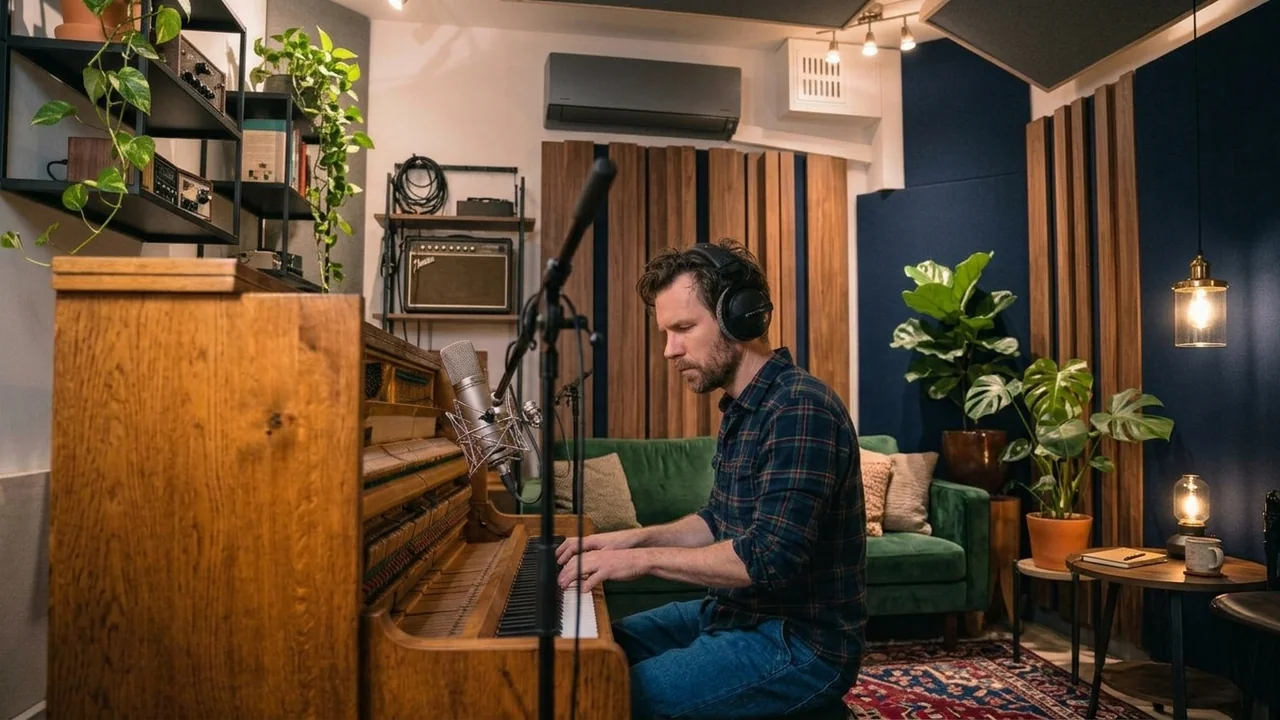
To record an acoustic upright piano at home, open the top lid and place two microphones above the strings, about 2 to 2.5 feet (600 to 800 mm) apart, one toward the bass strings and one toward the treble, then adjust their distance until the low and high notes sound balanced. To record a digital piano, plug its line outputs into your audio interface for a stereo audio recording, or connect it by USB or MIDI and record the performance as MIDI into a software instrument.
The method depends on which piano you have. An acoustic piano needs microphones and a decent-sounding room. A digital piano skips both. This guide covers each in turn, plus what to do about a room that sounds too live.
How do you record piano at home?
Start by answering two questions.
Is it acoustic or digital? An acoustic piano (upright or grand) makes sound in the room, so you need microphones. A digital piano or keyboard produces an electrical signal, so you connect it directly.
What does the song need? A solo piano piece benefits from a full, natural stereo sound. Piano under a vocal in a busy arrangement usually needs a tighter, more focused sound that leaves room for the voice.
Before recording anything, on any piano:
- Tune the acoustic piano if it has been a while. Mics pick up tuning problems that you stop noticing in person.
- Fix squeaks and rattles. Check the pedals, bench and any loose objects on top of the piano.
- Pick a quiet time. Pianos are dynamic instruments, and the quiet passages expose traffic, fridges and heating noise.
How do you mic an upright piano?
An upright piano’s strings and soundboard face the wall behind it, which is part of why uprights can be tricky. You have several options.
Option 1: Two mics above the open top (the reliable start)
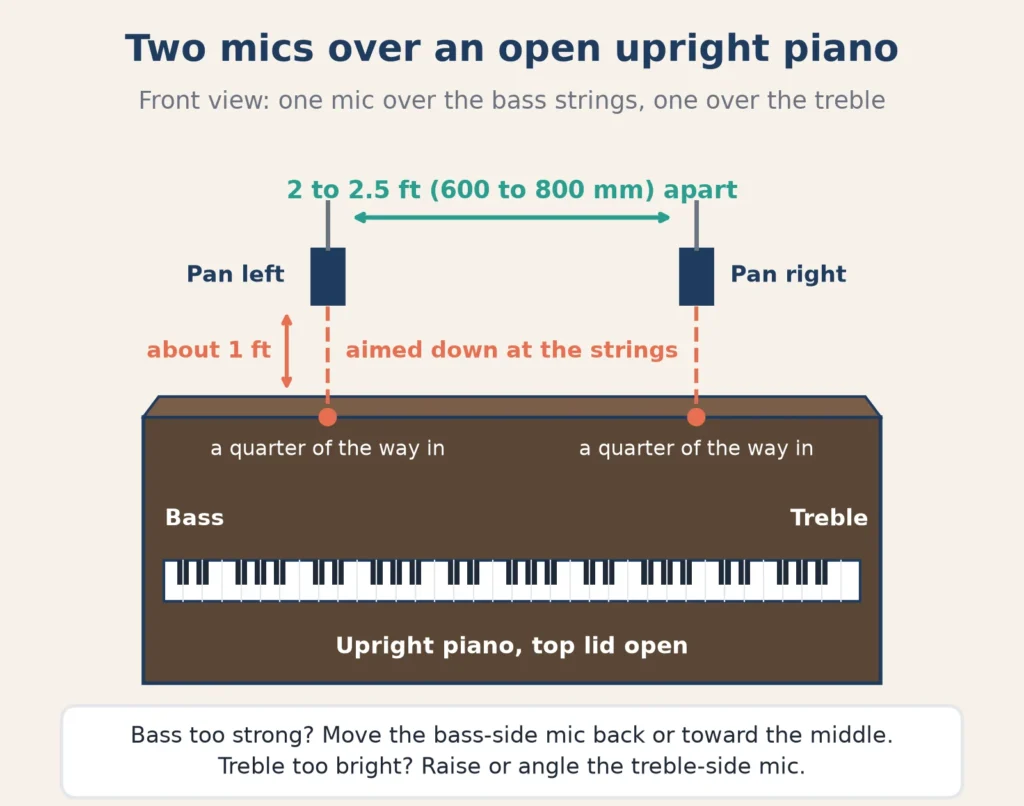
Sound On Sound editor Paul White answered this exact question for a reader recording an upright in a living room. In How should I record an upright piano? he suggests opening the lid, and often removing the upper front panel above the keys, then placing a spaced pair of mics “either in front of or above the instrument” with “a 600 to 800 mm spacing between the mics.” Adjust the mic distances until the bass and treble strings are evenly balanced.
How to set it up:
- Open the top lid. Remove anything sitting on the piano.
- Place one mic over the bass side and one over the treble side, about 2 to 2.5 feet apart, aimed down toward the strings.
- Start with the mics about a foot above the opening.
- Record a passage that uses the full keyboard and listen. If the bass is too strong, move the bass-side mic slightly back or further toward the middle. If the treble is too bright, raise or angle that mic.
- Pan the two tracks left and right in your DAW. Many players pan from the player’s perspective, with low notes on the left.
White also suggests aiming each mic at a point about a quarter of the piano’s width in from each end, which helps keep the string balance even.
Option 2: Near the player’s head
White notes that if a piano sounds good to the player, a spaced pair either side of the player’s head can capture that sound. This gives a natural “seat at the piano” perspective. It also picks up more room sound and more pedal and bench noise.
Option 3: Behind the soundboard
Because the soundboard faces the wall, some people pull the piano a little away from the wall and place mics behind it. This can sound warm and full, but it depends heavily on having space and on how the piano sounds from the back. Only move a piano if it is safe to do so, and move it back afterward.
How do you mic an upright piano with one mic?
One mic works well when piano supports a vocal or when you only have one input. Open the lid and place the mic above the center of the strings, a little toward the treble side, about a foot or two away. Treble notes are quieter and more delicate than bass notes on most pianos, so a slight treble bias evens out the balance. Record in mono and listen for the full range. If low notes swamp the recording, move the mic higher.
Pedal and mechanical noise
Mics close to a piano hear everything: the sustain pedal thump, the hammers, the bench creaking. White suggests wrapping some cloth around the pedals if pedal noise is a problem. Taking your shoes off and sitting still between phrases helps too.
How is a grand piano different?
If you have a grand piano, you have more options because the strings face upward and the lid opens wide.
- Lid open on the long stick gives the most open, bright sound. A pair of mics inside the curve, over the bass and treble strings, is a common starting point.
- Lid on the short stick or closed gives a softer, darker sound and less spill when recording with a singer.
- Mics further back, in the curve of the lid, capture a more natural, distant sound, but only in a good room.
The principles are the same as an upright: start with a spaced pair over the bass and treble, check the balance, and move the mics until the instrument sounds even.
How do you record a digital piano?
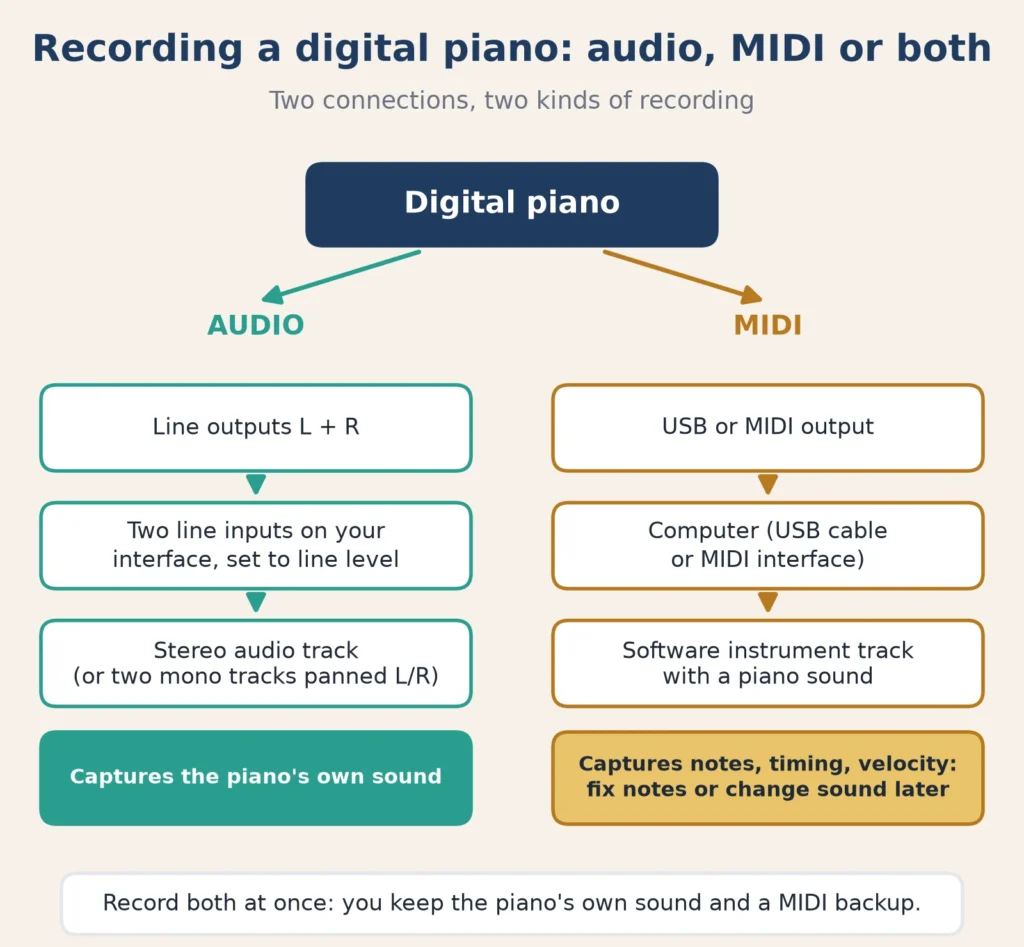
A digital piano gives you two ways to record. You can use one or both.
Method 1: Record the audio
Most digital pianos have line outputs, often labeled left and right. Some only have a headphone output.
- Connect the left and right line outputs to two line inputs on your audio interface with instrument or line cables.
- Set those interface inputs to line level, not mic or instrument.
- In your DAW, create a stereo audio track, or two mono tracks panned left and right.
- Play the loudest passage and set the input gain on your interface so peaks have plenty of room below the top of the meter.
- Record.
If the piano only has a headphone output, you can use it, but set the piano’s volume around halfway and adjust gain at the interface. Headphone outputs can distort if driven hard.
Method 2: Record MIDI
If your digital piano has a USB or MIDI output, you can record the performance as MIDI data, the notes, timing and velocity, rather than audio.
- Connect the piano to your computer with a USB cable (or a MIDI interface).
- In your DAW, create a software instrument track and choose a piano sound.
- Record-enable the track and play. Your DAW records what you played and plays it back through the chosen sound.
MIDI has big advantages for home recording. You can fix wrong notes, adjust timing, and change the piano sound later without replaying the part. Its downside is that the sound comes from the software instrument rather than your piano.
Doing both at once
Many people record the audio and the MIDI at the same time. You keep the piano’s own sound, and you have a MIDI backup if you want to fix a note or try a different sound later.
What should you do about a live-sounding room?
Living rooms are often bright and echoey: hard floors, bare walls and big windows. A piano excites the whole room, so room sound is a bigger issue than with a vocal.
White’s advice for domestic rooms is to use directional (cardioid) mics, because they “exclude much of the room reflection that might otherwise adversely colour the sound.” He also notes that if you are lucky enough to have a great-sounding room, you can move the mics further away to let more of it in.
Practical fixes:
- Move the mics closer to the strings. The closer they are, the less room you hear.
- Put a thick rug on a hard floor between the piano and the mics.
- Hang heavy blankets or duvets on stands or walls near the piano, especially on the side where the mics are.
- Close curtains over large windows.
- Clap and listen. If you hear a long ring or a flutter echo, add absorption where the reflection comes from.
How you listen back matters too. Accurate playback helps you hear whether a piano recording is boomy or harsh. Our page on why studio monitors are a necessity explains why, and home studio setup for beginners covers room setup in general.
A simple upright piano session, step by step
Here is a full session plan you can follow the first time.
- Prepare the room. Clear the top of the piano, roll out a rug, close curtains and switch off noisy appliances.
- Open the piano. Prop the top lid open. Remove the upper front panel if it comes off easily and safely.
- Set up two mics on stands above the strings, 2 to 2.5 feet apart, one over the bass and one over the treble.
- Set levels while playing the loudest passage. Leave plenty of headroom.
- Record a test of a passage that covers the whole keyboard, loud and soft.
- Listen on headphones and speakers. Is the bass even with the treble? Is there too much room? Can you hear pedal thumps?
- Adjust one thing at a time. Move a mic, add a blanket, or bring the mics closer, then record another test.
- Mark your positions with tape so you can match them if you record more parts later.
- Record the real takes. Several full takes give you options, and a piano part often improves once you relax.
Common piano recording mistakes
- Recording an out-of-tune piano. A microphone makes tuning problems obvious.
- Mics too close to the hammers. You get clicks and mechanical noise instead of tone.
- Uneven balance. One side of the keyboard much louder than the other usually means one mic is too close.
- Too much room. A bright, echoey living room can swamp the piano. Move the mics in and add soft furnishings.
- Clipping on big chords. Set levels on the loudest section, not a gentle intro.
- Ignoring noise. Pedal squeaks, bench creaks and breathing all end up on a quiet piano track.
Setting levels for piano
Pianos have a huge dynamic range, from a whisper to a full chord. Set your input gain while playing the loudest passage of the song, leaving plenty of headroom. Our guide to audio interface benefits explains what your interface does in the chain.
FAQ
Can I record my piano with my phone?
Yes, for ideas, practice and social clips. Place the phone a few feet from the piano, facing the open lid or the player, and test the volume. For a song release, a proper mic and interface give a much better result.
Where do you put a mic on an upright piano?
Above the open top lid, over the strings. With two mics, put one toward the bass and one toward the treble about 2 to 2.5 feet apart. With one mic, place it over the middle, slightly toward the treble.
Is it better to record a digital piano by audio or MIDI?
MIDI is more flexible because you can edit notes and change sounds later. Audio captures the piano’s own sound. Recording both at once gives you the best of each.
How do I video record myself playing piano?
Record the audio separately with mics or a direct connection, then sync it to the video. That gives much better sound than the camera’s microphone.
What is the best way to record a piano for a home demo?
For a quick demo, one mic over the open top of an upright, or a direct line or MIDI recording from a digital piano, is plenty. Save the two-mic setup for final recordings.