
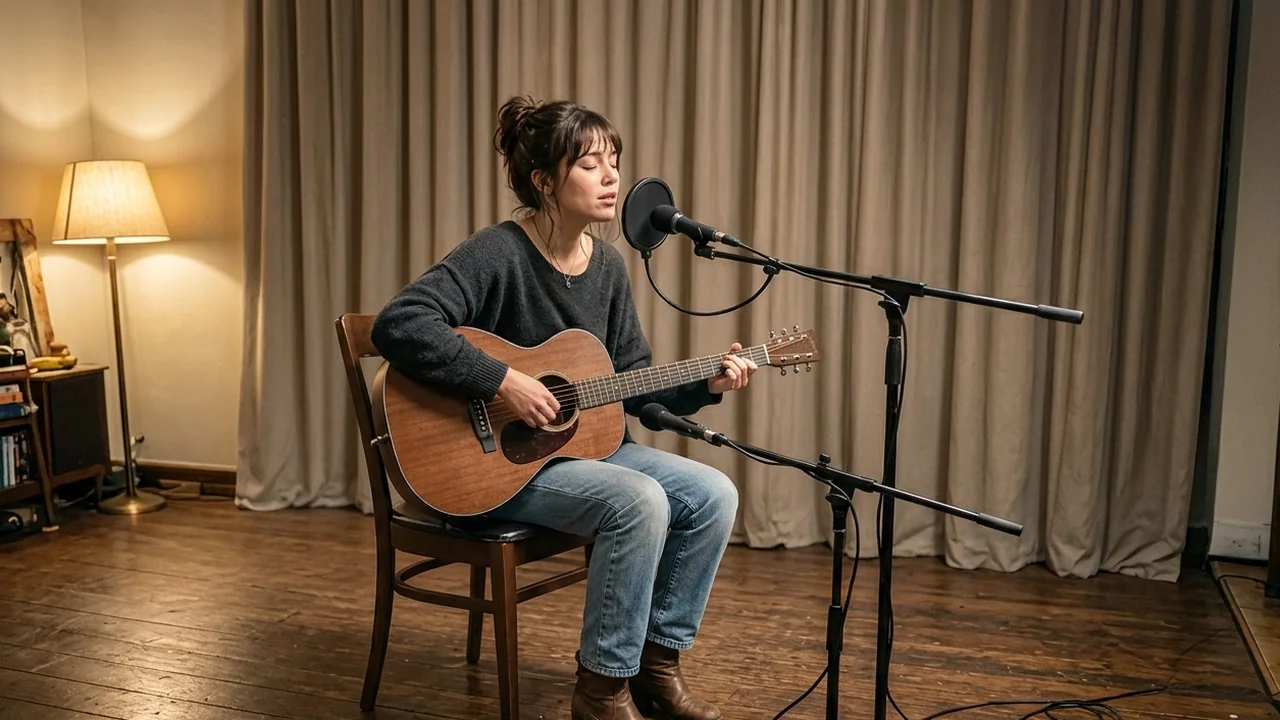
To record guitar and vocals at the same time, use two microphones on two separate tracks: one close to your mouth for the voice, and one below and in front of the guitar body, aimed up at the guitar from about nine inches away. Keep the vocal mic close, six to nine inches, keep the two mics as far apart as you can, and accept a little bleed between them. Some bleed is normal and usually sounds fine.
Recording both at once captures something overdubbing often loses: the natural way a singer-songwriter’s voice and guitar breathe together. The tradeoff is that each mic hears some of the other source, which limits how much you can edit later. This guide covers one-mic and two-mic setups, how to manage bleed and phase, and how to set it up in Logic Pro.
How do you record guitar and vocals at the same time?
You have three main options:
- One microphone capturing both voice and guitar.
- Two microphones, one for each, on separate tracks.
- A microphone for the voice and a direct signal for the guitar, if your acoustic has a pickup or you are playing electric.
Two mics is the most common choice because it lets you balance the voice and guitar after recording. One mic is simpler and can sound wonderfully natural. A direct guitar signal removes almost all guitar bleed from the vocal mic’s point of view, but sounds less natural on an acoustic.
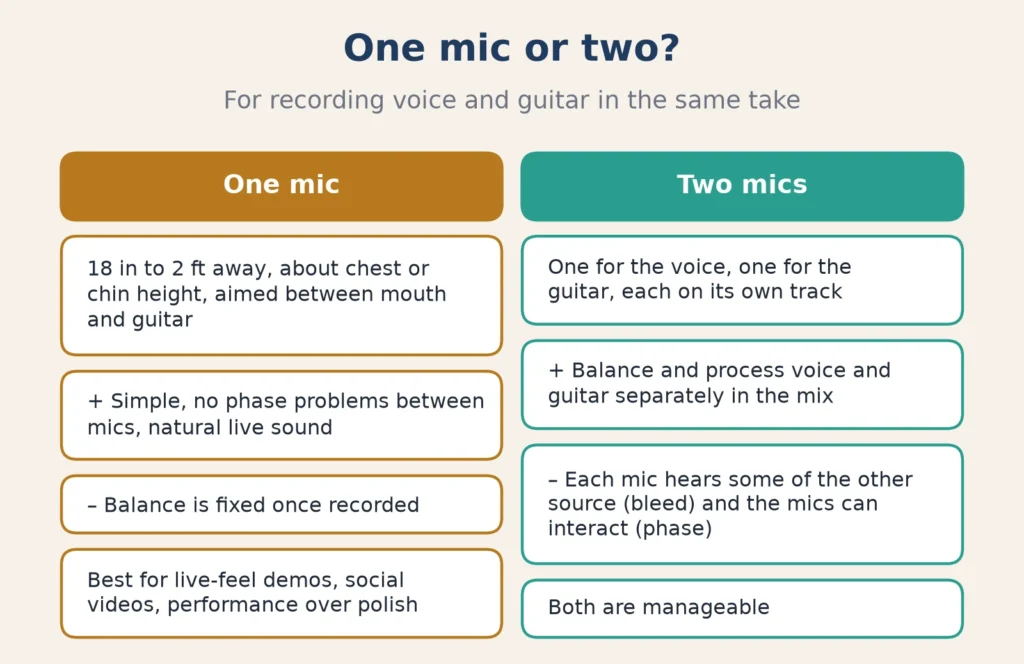
What is the difference between one mic and two mics for this?
One mic
Place a single mic in front of you, roughly level with your chest or chin, about 18 inches to two feet away, pointing between your mouth and the guitar. Move it up for more voice and down for more guitar.
Pros: simple, no phase problems between mics, a natural “live” sound.
Cons: the voice-to-guitar balance is fixed once you record. You cannot turn the guitar up in the chorus or fix a vocal line without affecting the guitar. You also get more room sound because the mic is further away.
One mic works well for live-feel demos, social videos and songs where the performance matters more than polish.
Two mics
One mic for the voice, one for the guitar, each on its own track.
Pros: you can balance voice and guitar in the mix, and apply different processing to each.
Cons: each mic picks up some of the other source (bleed), and the two mics can interact (phase). Both are manageable.
Where should you place two mics?
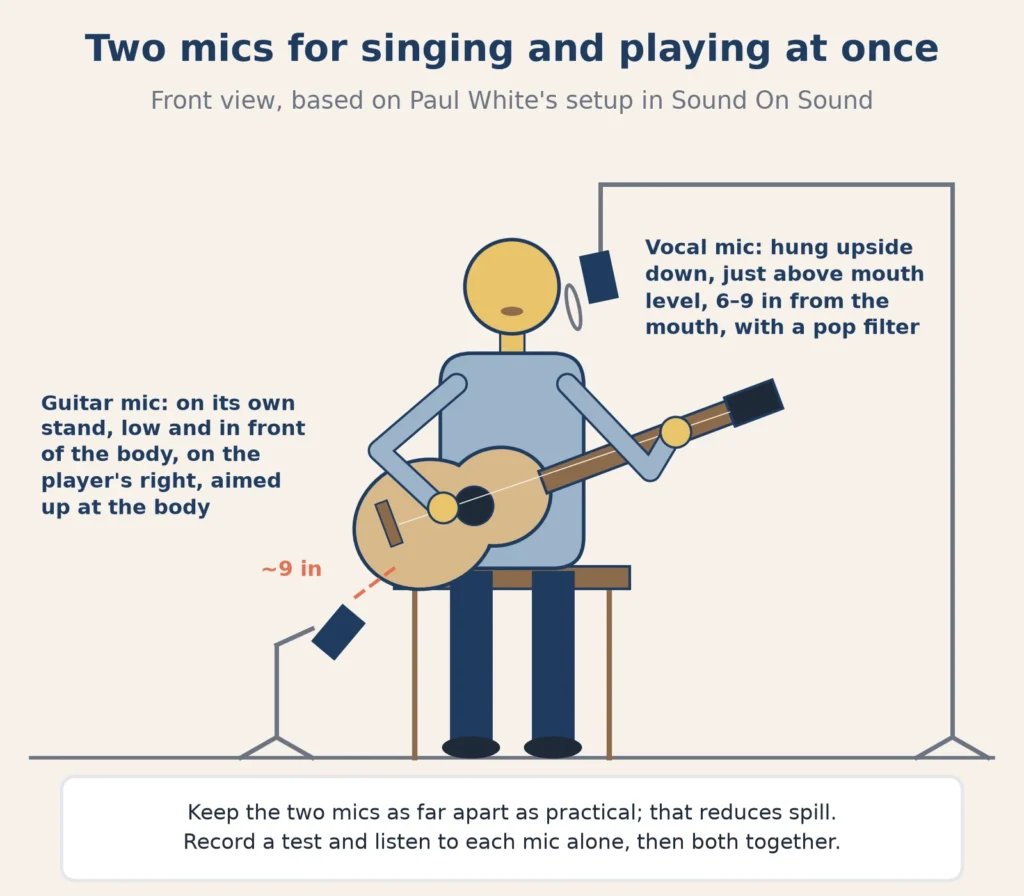
Sound On Sound editor Paul White answered this exact question in What is the best way to record guitar and vocals at the same time? He records many acoustic players who want to sing at the same time. His method:
- Guitar mic: below and in front of the guitar body, to the right of the player (from the player’s position). His image for it: imagine the guitar were an electric guitar and aim the mic as if looking “right down the jack socket from nine inches away.”
- Vocal mic: “ideally hung inverted just above the singer’s mouth level,” with a pop shield.
- Singer distance: “fairly close up, six to nine inches or so,” to keep spill to a workable minimum.
He explains why it works: the guitar mic sits low, at a reasonable distance from the singer’s mouth, so it picks up less vocal. The setup “puts both mics at roughly the same distance from the guitar strings,” which avoids significant phasing when the two signals are mixed.
Setting it up
- Sit on a chair without arms, in the position you will perform.
- Place the vocal mic just above mouth level, angled slightly down toward your mouth, six to nine inches away, with a pop filter.
- Place the guitar mic below and in front of the guitar body, aimed up toward the body from about nine inches.
- Keep the mics as far apart as practical. White notes that maximizing the physical distance between the mics reduces spill.
- Record a test and listen to each mic alone, then both together.
If you play solo guitar with no vocal, the placement priorities are different. Our guide on how to mic an acoustic guitar covers that.
The figure-eight option
White describes a second classic approach: figure-eight mics for both guitar and voice. A figure-eight mic picks up from the front and back but is “completely ‘deaf’ 90 degrees off-axis.” Point the side of each mic at the source you want to reject, so the vocal mic’s dead side faces the guitar and the guitar mic’s dead side faces your mouth. Watch the back of each mic, which still picks up sound, and use blankets or screens behind them.
If your mics have a switchable pattern, it is worth trying. If not, the standard two-mic setup works well.
What is bleed in recording, and how much is usable?
Bleed, also called spill, is sound from one source picked up by a mic meant for another. Here, the vocal mic picks up guitar and the guitar mic picks up voice.
Bleed is not automatically bad. White’s view is that, “providing the level of spill is low enough to allow you to get a good balance, it isn’t usually a problem,” as long as it is not too colored by room sound. In a natural performance, a little of each source in the other mic often makes the recording sound more cohesive.
Bleed becomes a problem when:
- It is loud enough that turning up one mic changes the sound of the other source.
- The room is echoey, so the bleed sounds distant and smeared.
- You want to edit one part. If you replace a vocal line, the old vocal is still faintly audible in the guitar mic.
- You want heavy effects on one source. Reverb on the vocal track also affects the guitar bleed in it.
How to reduce bleed
- Get closer to the vocal mic. The louder your voice is at its own mic, the smaller the guitar is by comparison.
- Keep mics apart and aimed away from the other source.
- Use the dead spots of directional mics. A cardioid mic rejects sound from behind. Aim the back of the vocal mic toward the guitar where you can.
- Treat the room. White suggests hanging improvised absorbers around the playing area, “the ubiquitous duvet being an obvious budget solution.” Less room reflection makes bleed sound cleaner.
- Use closed-back headphones at a sensible level, so the headphone mix does not leak into the mics. Our guide to headphones for the recording artist covers this.
Phase between the two mics
Because both mics hear both sources at slightly different times, combining them can cause some frequencies to cancel. Signs include a thin or hollow guitar when both mics are up.
To check:
- Listen to the guitar mic alone, then add the vocal mic.
- If the guitar thins out, flip the polarity on one track and listen again.
- If it is still thin, move the guitar mic a little and test again.
White’s placement, with both mics roughly equidistant from the strings, is designed to minimize this.
How do you record acoustic guitar and vocals at the same time in Logic Pro?
The DAW part is simple. You need an audio interface with at least two mic inputs.
- Connect the mics to inputs 1 and 2 on your interface. Turn on phantom power if your mics need it.
- Create two mono audio tracks in Logic Pro. Name them “Vocal” and “Guitar.”
- Set each track’s input in its channel strip: Input 1 for the vocal track, Input 2 for the guitar track.
- Record-enable both tracks. Logic records to both at once when you press Record.
- Set levels on your interface while singing and playing the loudest part of the song together. Each source is louder in its own mic, but the bleed adds level too.
- Set up your headphone mix with enough of both so you can perform comfortably.
- Record a full test take and check bleed and phase before the real takes.
Logic’s own guidance on monitoring is useful here. Apple’s Before recording audio page recommends using your interface’s direct monitoring if it has it, which keeps any delay out of your headphones while you perform.
Can you do this with electric guitar and vocals too?
Yes, and it is easier. Plug the electric guitar into your interface’s instrument input and record it direct, on its own track, while you sing into a mic. There is no guitar sound in the room for the vocal mic to pick up, apart from the faint sound of the strings, so bleed is minimal.
If you play through an amp in the same room, the amp will bleed heavily into the vocal mic. Keep the amp quiet, point it away from the vocal mic, or put it in another room. Recording direct is simpler for most home setups.
Performing well while you record both
Recording yourself singing and playing at once puts a lot on your plate. A few habits make it easier:
- Know the song cold. If you are still thinking about chord changes, your voice will tense up. Play it through many times before you record.
- Stay still. Small movements toward or away from either mic change the balance. Pick a comfortable posture and keep it.
- Mind your foot. Tapping your foot on a wooden floor shows up in both mics. Tap on a rug, or tap quietly.
- Watch your breathing. Heavy breathing between lines is close to the vocal mic and easy to hear.
- Do full takes. Because editing is limited, aim for complete performances rather than piecing together sections.
- Listen back between takes for bleed, balance and noise, not just performance. It is better to catch a problem on take two than take ten.
If you find singing while playing hard in general, slow the song down while practicing until both parts feel automatic, then bring it back up to tempo before you record.
Editing tracks recorded together
Because of bleed, editing is more limited than with separate overdubs:
- Small timing edits across both tracks together usually work. Edit them as a pair.
- Replacing one vocal line while keeping the original guitar can leave a ghost of the old vocal in the guitar track. Sometimes it is masked. Sometimes it is not.
- Comping works best if you comp both tracks at the same points.
- Tuning a vocal with guitar bleed is possible but less clean.
If you know you will want to edit heavily, record a guide performance together, then overdub separately. A scratch vocal recorded alongside the guitar can guide a later vocal overdub. For tips on the vocal side, see 13 tips for recording better vocals at home and 10 mistakes not to make while recording vocals.
FAQ
Can I record vocals and acoustic guitar with only one mic?
Yes. Place it 18 inches to two feet away, between your mouth and the guitar, and move it up or down to balance the two. The balance is fixed once you record.
How do I record music and voice at the same time?
Use separate mics or inputs for each source on separate tracks, record-enable both, and record. Keep the vocal mic close to limit bleed from the instrument.
Should I record guitar and vocals together or separately?
Together for feel and a natural performance. Separately for maximum editing control. Many people try a take together first and only overdub if they need to.
Which mic should I use for each?
Use what you have. Placement and distance matter more than the specific mic.
How much bleed is too much?
If turning the guitar mic up or down clearly changes the vocal’s sound, or the bleed sounds echoey, there is too much. Move the vocal mic closer, separate the mics, or add blankets.