
To record electric guitar at home without an amp, plug the guitar straight into your audio interface’s instrument (Hi-Z) input, set the input gain so your hardest strums peak well below the top of the meter, and record the clean, direct signal, called a DI track, into your DAW. You shape the final tone afterward, while you listen back, instead of committing to it during the take.
This is how a lot of guitar is recorded now, at home and in professional studios. It is quiet, so you can record at night. You do not need to mic a speaker in an untreated bedroom, and you can change your mind about the sound later. This guide covers the signal path, setting a clean level, recording a good DI, and when miking a real amp is still worth it.
How do you record electric guitar at home?
There are two basic approaches:
- Mic an amplifier. Put a microphone in front of a guitar amp’s speaker and record that. The amp creates the tone, and the mic captures it.
- Record direct (DI). Plug the guitar into an instrument input and record the raw signal from the pickups. The tone is shaped later.
Both are valid. For most home recordists, recording direct solves the biggest problems: noise complaints, room sound and the difficulty of miking a loud amp in a small space. The rest of this guide focuses on the direct method.
How do you record electric guitar without an amp?
What you need
- Your guitar and a standard instrument cable.
- An audio interface with an instrument input, usually marked “Inst” or “Hi-Z,” or a switch that sets an input to instrument level.
- Headphones or monitors.
If your interface does not have an instrument input, a DI box converts the guitar’s signal to one a mic input can accept.
The signal path
Guitar → cable → instrument input on your interface → DAW track.
That is it. If you use pedals, the path becomes guitar → pedals → interface. Many people still record a clean DI even when they play through pedals, by splitting the signal or by recording the clean guitar first.
Step by step
- Tune the guitar. In Logic Pro, Apple’s Before recording audio checklist mentions the Tuner button in the control bar for exactly this.
- Plug into the instrument input. Use the front-panel instrument jack, or set the input’s switch to Inst or Hi-Z.
- Create a mono audio track in your DAW, with its input set to the interface input you are plugged into.
- Record-enable the track and turn on input monitoring so you can hear yourself.
- Set the input gain (details below).
- Add a temporary sound for monitoring if you like. Many players find a completely clean guitar uninspiring to perform with. Monitoring through a basic guitar tone on the track is fine, because effects on the channel are not printed into the recorded file.
- Record.
What is a DI guitar recording?
DI stands for “direct injection” or “direct input.” A DI recording is the guitar’s signal straight from the pickups, before any amplifier or speaker shapes it.
On its own, a DI track sounds thin, bright and plain. That is normal. Hugh Robjohns, writing about DI boxes in Sound On Sound’s Prepare to DI!, explains that the amp and speaker “play a very big part in shaping the instrument’s tonality,” and that a signal taken straight from the guitar “will typically sound exaggeratedly bright and dynamic” compared with what comes out of a speaker. A DI is raw material, not a finished guitar sound.
The reason to record it this way is flexibility. Because the take is clean, you can:
- Try different tones later without replaying the part.
- Send the DI back out through a real amp later and mic it. This is called reamping.
- Keep a clean backup alongside an amp recording, in case you want to change the sound.
Why is an instrument input important?
Electric guitar pickups put out a high-impedance signal. A microphone input or a line input expects something different, so plugging a guitar into the wrong input can make it sound dull, thin or weak.
An instrument (Hi-Z) input or a DI box presents the guitar with the high-impedance load it expects. The Sound On Sound article explains the technical side in detail. In practice: use the instrument input or a DI box, and your guitar will sound like itself.
A few related tips:
- Keep the cable reasonably short. Long instrument cables can dull the high end.
- Use a decent cable. A crackly cable creates noise that ends up on the recording.
- Turn the guitar’s volume knob up. Many players set their tone with the guitar volume at full. Recording with it rolled back gives you a weaker signal and more noise.
How do you set a clean, unclipped instrument level?
Direct guitar signals are very peaky. A hard pick attack or a big chord can spike much higher than the average level, and a clipped DI is ruined. You cannot remove that distortion later.
The process
- Start with the interface gain all the way down.
- Play the loudest thing you will play in the song: the hardest strum, the biggest chord, the most aggressive pick attack.
- Raise the gain until those peaks reach around -12 to -10 dBFS on your DAW’s meter.
- Check the interface’s clip light. It should never light.
- Play the quiet parts and confirm they are still clearly visible on the meter.
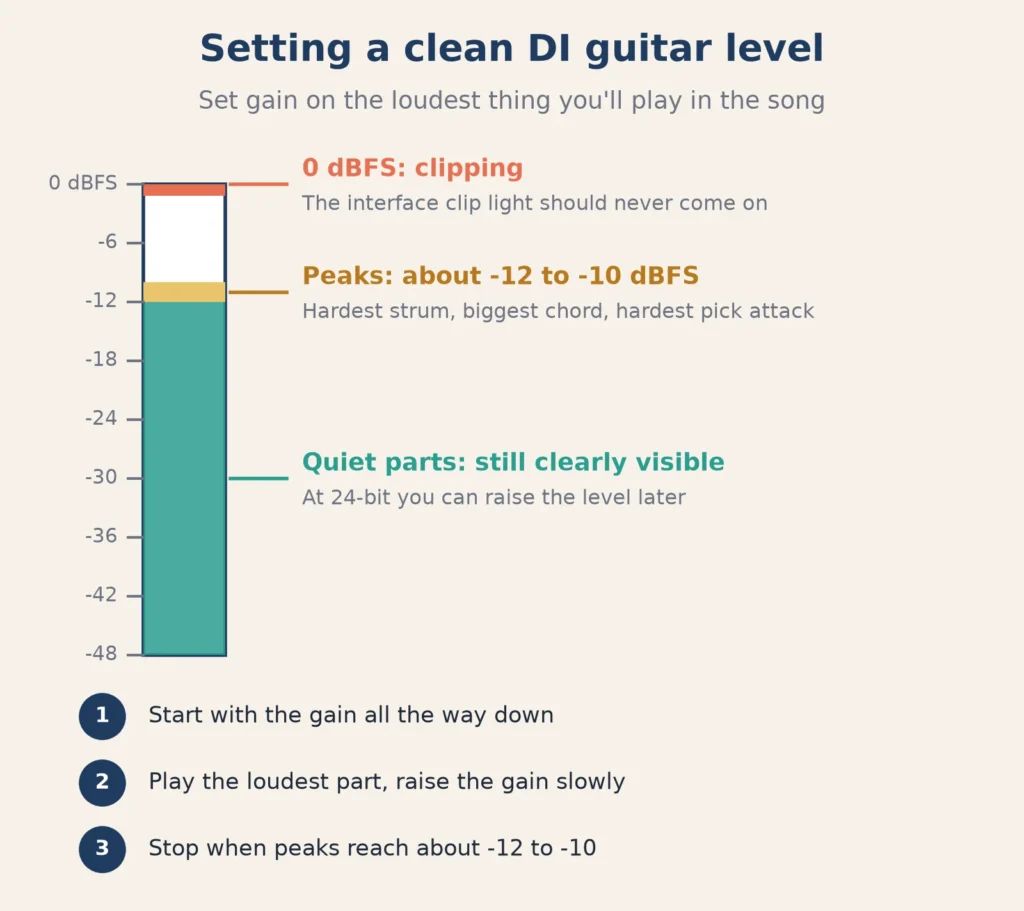
Leaving headroom matters even more with guitar than with vocals because of those sharp peaks. At 24-bit, a DI peaking at -12 dBFS has plenty of resolution, and you can raise the level later. The same principle applies to vocals and every other source. Our guide to what gain staging is explains where those numbers come from.
Noise and hum
Single-coil pickups pick up hum from electrical devices. If you hear buzz:
- Move away from your computer monitor, power supplies and dimmer switches.
- Rotate your body. Hum often changes with the guitar’s angle.
- Use a power strip with nothing noisy plugged into it.
Some hum is part of single-coil guitars, but placement can reduce it a lot.
Recording tips for a great DI take
- Play with the dynamics you want in the final song. Even though the tone comes later, your touch is recorded now.
- Record several takes of tricky parts and comp the best.
- Double rhythm parts by playing them twice rather than copying one take. Two real performances sound wider.
- Mute the strings you are not playing. Without an amp in the room, string noise is easy to miss while tracking but obvious later.
- Label your tracks “Gtr DI” so you can tell the clean recording from any processed versions.
For more ways to stay organized and consistent during sessions, see our 7 steps to being a better studio engineer.
How reamping works
Reamping is the main reason professionals record a DI even when they have great amps. The idea is simple: record the clean guitar now, then later play that recording back out of your interface, into a real amp, and mic the amp.
The workflow looks like this:
- Record the DI track as described above.
- When you are ready to commit to a tone, send the DI track out of one of your interface’s outputs.
- Because an interface output is a line-level signal, it usually goes through a reamp box, which converts it back to something that behaves like a guitar signal for the amp’s input.
- Mic the amp and record the result on a new track while the DI plays back.
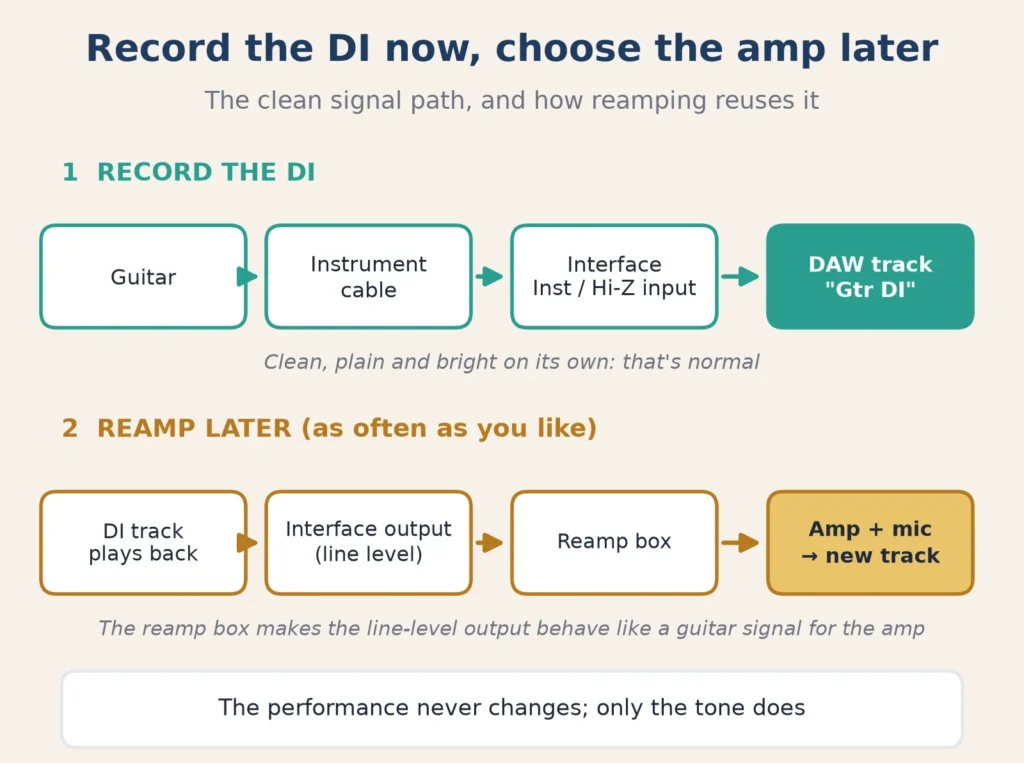
You can repeat this as often as you like with different amps, settings or mic positions, and the performance never changes. For home recordists, it means you can record quietly at night and reamp on a weekend afternoon when you can make noise.
Common DI recording mistakes
- Using a line or mic input instead of an instrument input or DI box. The guitar sounds dull and weak.
- Recording too hot. Pick attacks clip easily. Leave plenty of headroom.
- Judging the raw DI. It is supposed to sound plain. Judge the performance, not the tone.
- Leaving the guitar volume low. You get a weaker signal and more noise.
- Ignoring hum until mixing, when it is much harder to deal with.
- Not labeling tracks. Months later you will not know which track is the clean DI.
- Playing harder or softer than the song needs because the clean signal feels different from an amp. Play the part as you would in the band.
Recording bass the same way
Everything in this guide also applies to bass guitar. In fact, recording bass direct is standard practice in many studios, because a clean bass DI is often what ends up in the mix, sometimes blended with a miked amp. Plug into the instrument input, set the level on your hardest notes, and watch for string buzz and fret noise, which are easier to hear on a clean bass track.
When would you still mic a cabinet, and when is a clean recording enough?
A DI recording is enough when:
- You need to record quietly.
- Your room is small, untreated or shared.
- You want flexibility to change the tone later.
- The guitar is one part of a busy arrangement.
- You are writing or demoing and want to move fast.
Miking a real amp is worth it when:
- You have an amp you love and a room where you can play it at the volume it sounds best.
- The song depends on the interaction between player, amp and room, like feedback, sustain or the feel of a loud amp in front of you.
- You want to commit to a tone and stop tweaking.
The best of both
Many recordists record a DI track and a miked amp at the same time. You get the committed amp sound, plus a clean DI in case you want to reamp or change the tone later. If you do this, record the amp track and the DI track on separate tracks so you can use either.
Setting up a comfortable place to play
Without an amp, you are free to record anywhere: the couch, the bed, a desk chair. Choose a spot where you can sit comfortably, reach your computer, and hear clearly in your headphones. Our guide to home studio setup for beginners covers layout and positioning. If you are new to interfaces, see our article on audio interface benefits.
FAQ
How can I record guitar at home?
Plug your electric guitar into your audio interface’s instrument input, set a clean level, and record a DI track in your DAW. For acoustic guitar, you would use a microphone instead.
What equipment is needed to record a guitar at home?
A guitar, an instrument cable, an audio interface with an instrument input, a computer with a DAW, and headphones or monitors. An amp and microphone are optional.
Can I plug my guitar straight into my computer?
Not into the computer’s built-in audio jack for good results. Use an audio interface with an instrument input, or a DI box into a mic input.
Why does my DI guitar sound bad?
A raw DI is supposed to sound thin and bright. It is the clean signal before an amp shapes it. Tone comes later.
Should I record guitar in mono or stereo?
Record a single guitar DI as a mono track. The guitar’s output is mono. Width comes later, from doubling the part or from stereo effects.
Can I record with my pedals?
Yes. You can record through your pedals, but the effects are then part of the recording. If you want flexibility, record a clean DI as well.
Do I need an amp to record electric guitar?
No. A direct recording through an instrument input captures your performance without an amp. An amp is an option, not a requirement.